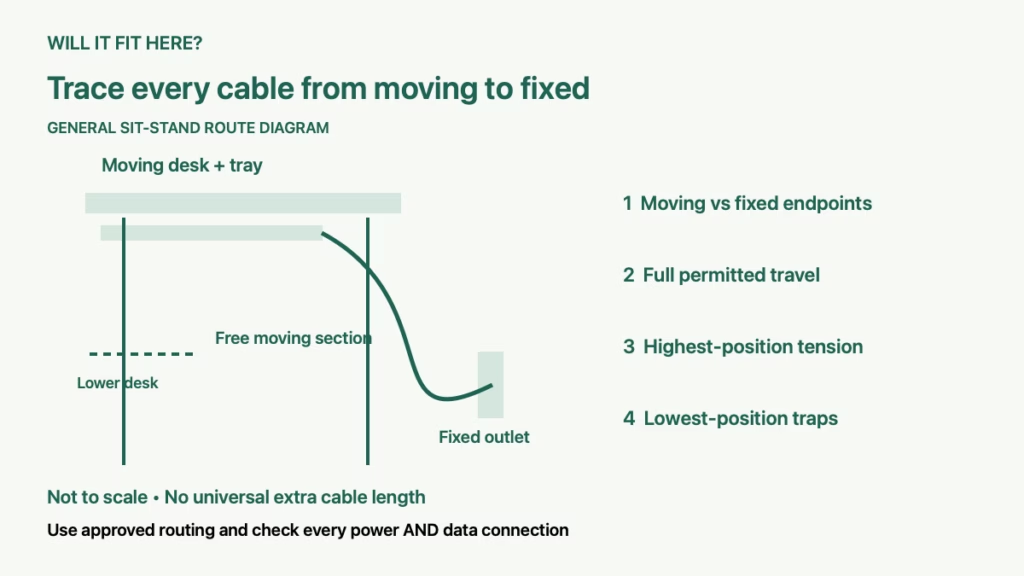
Quick answer: Standing desk cable slack is sufficient only when every cable that crosses from the moving desk to a fixed point can follow the desk through its permitted travel without tension, pinching or dragging. Check the highest and lowest positions and the route between them. A tidy bundle at sitting height can still pull on a plug or trap a loop as the desk moves.
This guide is for a sit-stand desk with monitors, a dock, a desktop computer, speakers or other wired equipment. It covers cable-route planning after assembly, using the exact desk instructions. It does not provide power-supply modifications, electrical repairs or a universal extra cable length.
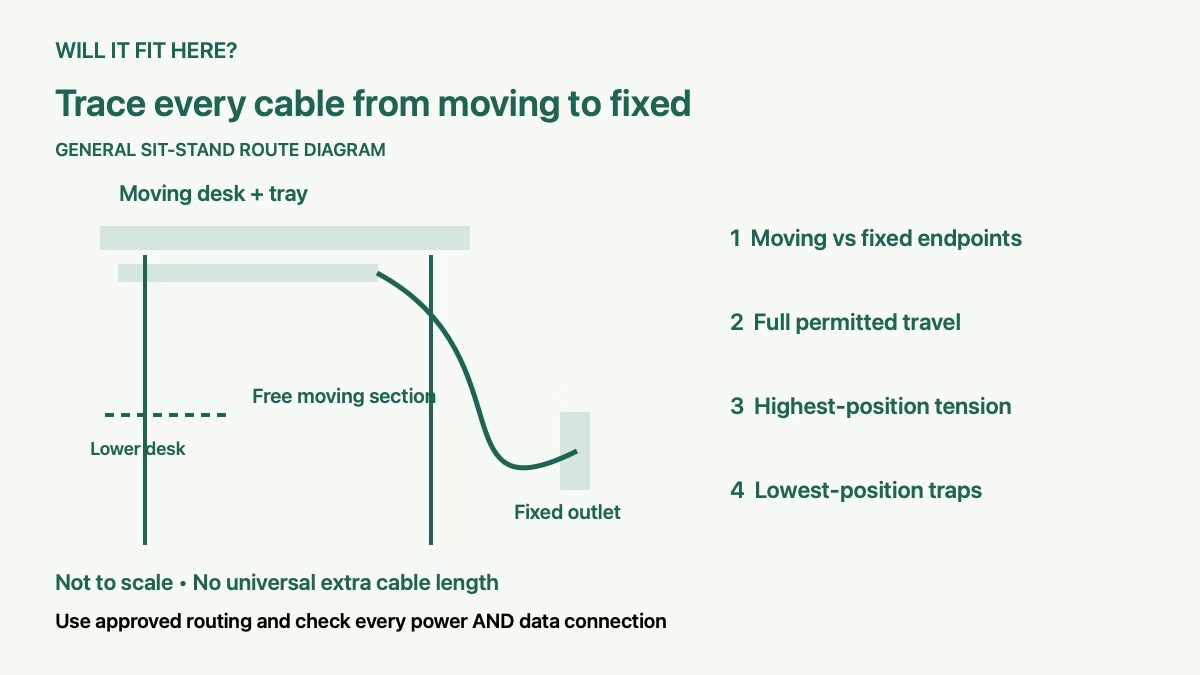
1. Map fixed and moving cable endpoints
Draw the desk, its cable tray, wall outlet and any computer that remains on the floor or a separate shelf. Label each endpoint as moving with the desktop or staying fixed. The important cable is the one that crosses between those two groups, not necessarily the longest cable in the setup.
For example, a monitor and dock attached to the desktop may move together, while the dock’s cable to a floor-standing computer must bridge the height change. A desktop-mounted power arrangement can reduce the number of crossing leads, but its own connection to the fixed wall outlet still needs a clear moving route and manufacturer-approved placement.
Include power, display, USB, Ethernet and audio leads in the map. Do not assume the power cable is the only possible limit. A short data cable can pull against a port even when the desk’s own supply lead moves freely.
2. Plan standing desk cable slack along the real route
Measure the cable path through the approved tray or management system, including bends and the connection to the fixed endpoint. Compare the usable installed length with the greatest separation reached during desk travel. A straight-line distance from desktop to socket leaves out the actual route.
As a model-specific example, IKEA’s MITTZON advice and instructions give a height-setting interval of 62–126 cm, or 24.4–49.6 inches. The difference describes desk travel; it is not a universal amount of extra cable to add. Endpoint position and routing determine how much usable length your particular setup needs.
Plan a freely moving section where the cable changes position. Keep it away from the desk’s legs, frame joints, neighboring furniture and places where it could be squeezed. Follow the desk and cable-management accessory instructions for attachment locations rather than anchoring a moving loop wherever it looks neat.
Record the cable that has the least remaining freedom. Buying a longer display lead does not solve a shorter USB connection that still crosses the same moving gap. Confirm replacement cable compatibility with its device before changing it.
3. Check standing desk cable slack at both travel limits
After assembly and routing according to the manual, clear the moving area and observe the desk using its prescribed controls. Follow the manufacturer’s operating and rest requirements. Keep people, hands and objects out of pinch areas; stop movement if a cable begins to tighten or catch.
At the upper position, look for tension at plugs and ports, a tray pulling against a fixed cable, or a lead stretched across a frame corner. The moving section should retain the freedom required by the instructions. Do not pull a connector partly out to gain apparent length.
At the lower position, inspect the extra loop. It must not become trapped under a leg, caught in a chair wheel or gathered into a pinch point. A cable that is long enough at the top can still have an unsuitable path at the bottom.
IKEA’s MITTZON troubleshooting guidance specifically calls for full electrical-cable movement and reasonable slack at the highest position when investigating stop-and-reverse behavior. It also requires the cable to have full mobility during setup. These are MITTZON instructions; check the equivalent requirements for your own desk.
4. Inspect the tray, chair and surrounding equipment
Your standing desk cable slack check should include the whole moving area, not just the vertical loop. A hanging tray, rigid connector or power adapter can meet a drawer unit or wall-mounted shelf before the desktop reaches its intended position. Measure from the lowest moving accessory as well as from the desktop.
Keep a floor-standing computer, printer or speaker separate in the route plan unless an approved mount actually moves it with the desk. A cable attached to an object on the floor can gradually pull that object as the desk rises. The connection needs free travel, not friction holding the equipment in place.
Check the chair and any footrest before moving the desk. IKEA’s cited manual says to remove the office chair before adjustment and to keep the desk clear of fixed obstructions. Apply the exact movement instructions for your model and keep watching the route during adjustment.
If you also use a monitor arm, review its movement separately. Raising the desk and extending the arm can change a display cable’s path in different ways. Check the intended combinations without using a cable as an arm stop.
5. Recheck standing desk cable slack after setup changes
Keep a simple record of the desk model, approved travel range, fixed endpoint positions and the cable routes that passed inspection. Repeat the standing desk cable slack check when moving the desk, adding a monitor, changing a dock or relocating the computer. Even an identical-length replacement lead can behave differently if its connector is larger or its route changes.
Stop using a damaged or trapped lead and follow the device manufacturer’s replacement guidance. Use the desk’s supplied or explicitly approved power supply; the cited MITTZON instructions require its included unit. Do not alter the desk electronics or improvise a power extension to conceal an unresolved route.
If the desk stops or reverses, check the visible cable path and obstructions in accordance with its manual before assuming a motor fault. Do not keep cycling it against tension or bypass protective behavior. For an unresolved fault, contact the manufacturer; use a qualified electrician if the fixed electrical service needs changing.
Questions about moving desk cables
Is there a standard extra six inches to leave? No universal amount works for every height range, endpoint position and routing system. Check the actual permitted movement.
Can I bundle everything tightly below the desktop? Secure cables only in permitted locations while preserving the freedom of every lead crossing to a fixed point.
Do I need to test the lowest height? Yes. Extra cable can catch or drag even after the upper-position length check succeeds.
Sources and related desk setup checks
Source checked October 6, 2026: IKEA’s MITTZON advice and instructions, English section, pages 3–5. Use the instructions supplied for your model and market. For desktop space and another cable-connected accessory, see dual-monitor desk fit and LED strip layout checks.