Quick answer
A 65-inch TV in a 60-inch alcove can be physically narrow enough, but the opening must also accommodate its required ventilation and installation space. Measure the exact TV body, then add the left and right clearances from that model’s manual. Check height, depth, cables, and mounting access separately.
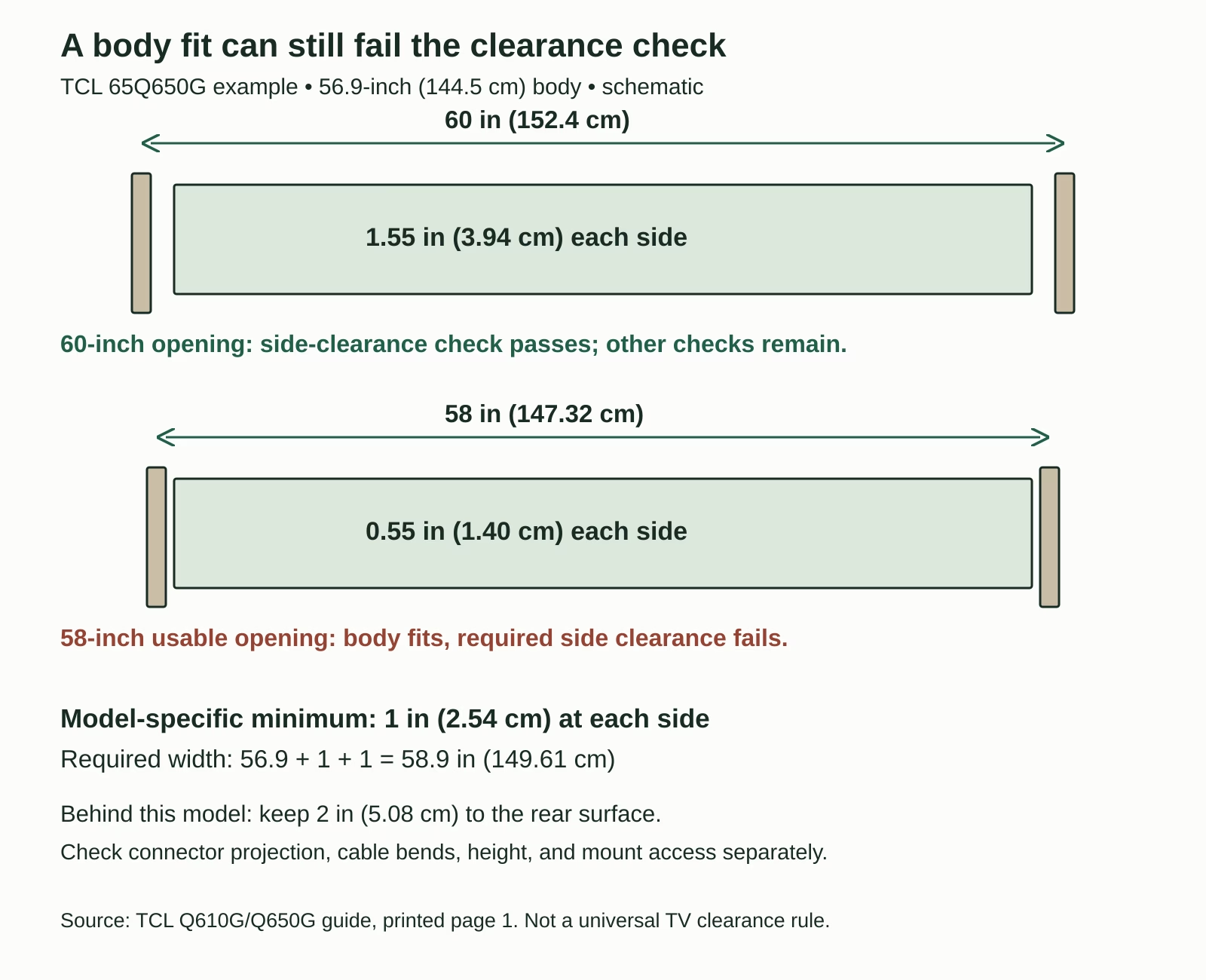
For example, a 56.9-inch-wide body in a true 60-inch opening leaves 1.55 inches (3.94 cm) on each side when centered. Whether that is enough depends on the model. There is no universal 4-inch side-gap rule.
If the TV will sit on furniture, also use our 65-inch TV on a 55-inch stand guide to check the base footprint, support depth, load limits, and body overhang.
Measure the opening for a 65-inch TV in a 60-inch alcove
This guide is about an alcove or cabinet recess with surrounding surfaces. A 60-inch section of open wall between decorative marks is a different installation: those marks do not behave like solid sidewalls.
Measure the opening at the front and at the depth where the screen will sit. Check the top, middle, and bottom. Use the smallest usable width, including trim, hinges, shelf brackets, outlets, or other obstructions. A 60-inch (152.4 cm) back wall does not help if the front trim narrows the opening.
Record the clear height and depth, too. For a tabletop installation, measure height from the actual supporting surface. For a wall mount, establish where the TV’s top and bottom will land after the bracket is installed, rather than assuming the VESA holes are vertically centered.
A tape outline or cardboard rectangle can help visualize the body and handling route. It cannot prove ventilation, wall strength, or mount compatibility.
Add the model’s required clearances
Use this width check with all measurements in the same unit:
Required opening width = TV body width + left clearance + right clearance.
Do not calculate from the 65-inch diagonal. Do not use the packaging width. And do not select a clearance by averaging online advice: find the installation or safety section for your exact model and intended mounting method.
When a manual uses a diagram, identify which gap each arrow represents. Rear spacing, side spacing, and clearance above the TV can differ. A model-specific flush-mount method may have its own conditions; its instructions do not transfer to an ordinary cabinet installation.
If the documented requirements are unclear or the alcove is unusually enclosed, send the manufacturer a dimensioned sketch before ordering. A cool-feeling cabinet during a short trial is not a substitute for the installation requirements.
A real-model width check
Consider the US TCL 65Q650G. TCL Customer Support’s US-model dimensions give its body without feet as 56.9 × 32.8 × 3.2 inches (about 144.5 × 83.3 × 8.1 cm). The manufacturer’s Q610G/Q650G quick-start guide specifies 1 inch (2.54 cm) above and to the sides, and 2 inches (5.08 cm) behind in its Important Information section (printed page 1).
Its calculated width envelope is therefore 56.9 + 1 + 1 = 58.9 inches (149.61 cm). This is a width check for this example, not permission to put any 65-inch television in that opening.
| Opening | Centered side gap | Width-check result |
|---|---|---|
| 60 in (152.4 cm) | 1.55 in (3.94 cm) | Exceeds the stated 1-inch side clearance; other checks remain. |
| 58 in (147.32 cm) after trim | 0.55 in (1.40 cm) | Body fits, but the required side clearance does not. |
| 56 in (142.24 cm) | No side gap | The 56.9-inch body itself is too wide. |
The 58-inch case is the easy mistake to miss: the TV can slide into the opening, yet the installation still fails the side-clearance check. Moving it off-center only trades space from one side to the other.
Inches in the body specification are rounded manufacturer figures. Conversions and calculated gaps are shown to clarify the arithmetic, not to imply precision beyond the source or your measurement. A borderline opening needs verification against the actual unit and current instructions.
Check height, depth, and cables
A passing width result is only one line on the checklist. Measure these other constraints before selecting the TV or bracket:
- Height: use the assembled height with feet for a tabletop setup, or the body height and installed mount position for a wall-mounted setup. Add the required clearance above and below as applicable. Include any raised soundbar position.
- Depth: check the full stand footprint for tabletop use. For a wall-mounted TV, account for the bracket’s installed position and the TV’s thickest rear section, then verify the actual rear gap.
- Connected cables: allow room for the plug body and a natural cable bend. A port facing sideways can consume the narrow side gap; a rear-facing connector can prevent the TV from sitting at the planned depth.
- Access: confirm that you can reach the mount locks, release straps, power connection, and the ports you will use. Plan how to remove the TV for service.
The ventilation gap is measured to the relevant surrounding surface. It is not automatically a cable-storage allowance. Do not squash a plug or coil cables against a vent to achieve the body position you calculated.
For a bracket that moves, check the whole movement path. The TV’s corners can strike sidewalls as it swivels, and cable slack must suit the approved range of movement. A mount extending beyond the alcove also changes the TV’s projection into the room.
Confirm the installation as a whole
Keep the alcove’s air path open. Decorative panels, cabinet doors, a soundbar, or equipment added later can reduce the space you measured. Treat nearby heat sources and other electronics as separate installation constraints, each with its own instructions.
For tabletop use, the shelf or console still needs adequate support area and a verified load rating. For wall mounting, use a compatible mount and a suitable supporting structure. Do not assume a cabinet back panel or drywall alone can carry the installation.
The TCL example’s guide also calls for professional wall installation (printed page 6). Follow that requirement rather than treating the width calculation as an installation tutorial. For other TVs, use their own mounting instructions.
Where furniture supports the TV, follow CPSC’s TV and furniture anchoring guidance and the relevant product instructions. An alcove enclosing the sides is not an anti-tip system.
Make the final fit decision
Keep a short record before buying: exact TV model; smallest usable opening width, height, and depth; installation method; body or assembled dimensions; required gaps; and where the cables and mount-release points will go.
- Body too large: choose a smaller TV or a different location.
- Body fits, clearances fail: choose a smaller model, a different location, or an installation specifically approved for the space. Do not treat an added fan as permission to ignore the manual.
- Body and clearances fit, access fails: revise the approved mounting or cable plan before installation.
- All checks documented: confirm against the delivered TV and the latest instructions before mounting.
Would a 55-inch TV solve the problem?
It may give you more room, but repeat the calculation using that model’s actual dimensions and requirements. A smaller diagonal does not guarantee a particular stand depth, rear connector arrangement, or mounting method.
Can the screen sit in front of the alcove?
Possibly, with a suitable approved installation. That changes the geometry: verify structural support, clearances in the final position, room projection, cable routing, and service access. Do not extend a shelf or bracket beyond its rated configuration.
Bottom line: a true 60-inch opening is wide enough for some 65-inch TV bodies and some model-specific side-clearance requirements. Confirm the complete installed arrangement before calling it a fit.
Sources checked October 4, 2026. Examples are calculations from published dimensions and instructions, not hands-on heat or fit tests.