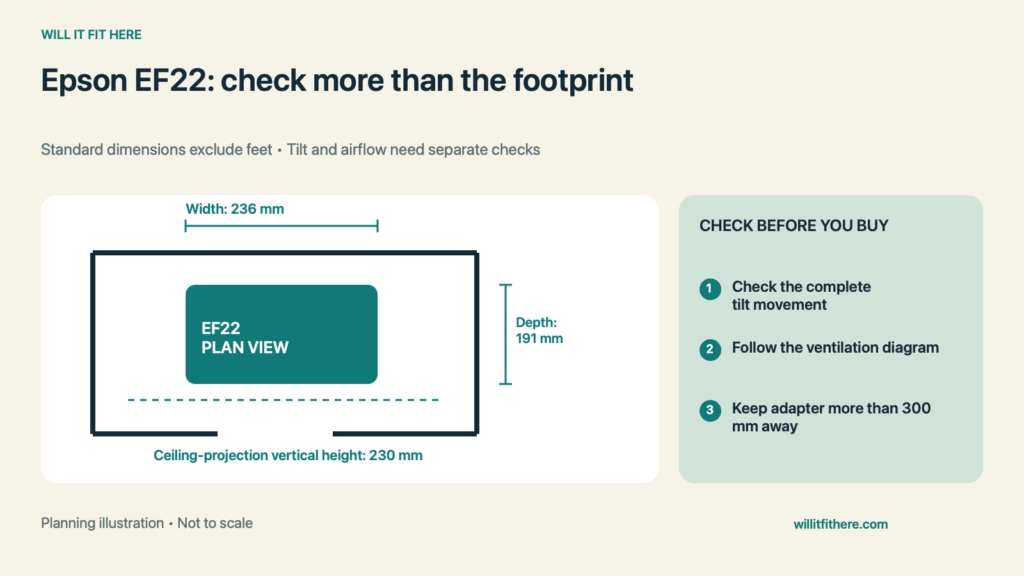
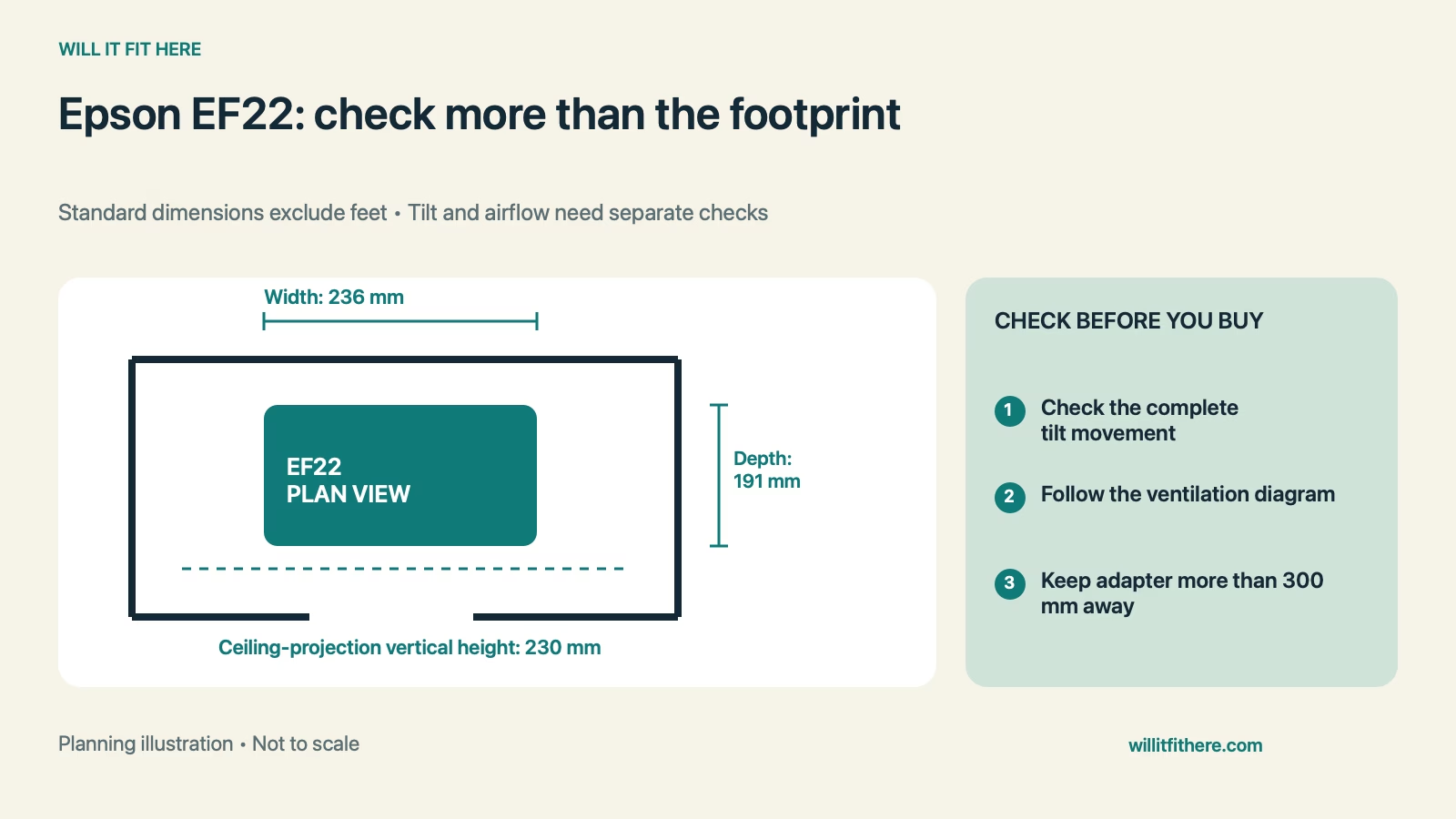
Fit verdict: Epson EF22 Fit on a shelf changes when you tilt the projector. Epson lists 191 × 236 × 191 mm in height × width × depth order, excluding feet, and shows a 230-mm vertical height when projecting toward the ceiling. A shelf that accepts the projector facing forward may therefore obstruct it in another position. Ventilation and the separate AC adapter need additional space.
This guide uses published specifications and planning calculations, not a firsthand product test. Examples are hypothetical.
Dimensions and conditions
| Measurement | Published specification |
|---|---|
| Product covered | Epson EpiqVision Mini EF22 |
| Dimensions excluding feet, H × W × D | 191 × 236 × 191 mm |
| Vertical height when projecting on ceiling | 230 mm, as shown in Epson’s dimension drawing |
| Published weight | Approximately 3.0 kg |
| Installation spaces | 100 mm and 300 mm in Epson’s orientation-specific diagram; consult the drawing |
| AC adapter separation | More than 300 mm from the projector, per Epson’s instructions |
| Tilting with connected cables | Epson says to disconnect cables before tilting toward the ceiling |
1. Confirm the EF22 and its measurement basis
Start Epson EF22 Fit with the EF22 rather than the EF21. They share a manual, but the EF22 has a different stand arrangement and external dimensions. Note that the basic dimension table excludes feet, so it should not be used as an exact finished-height limit for a tight opening. Check the dimension drawings and the actual product for the installed configuration. Decide whether the shelf is only a storage location or whether you expect to run the projector there; an operating position has more demanding requirements.
2. Trace the tilt movement under the shelf above
Measure from the support surface to the lowest obstruction above it, including a shelf lip or light fixture. Epson’s ceiling-projection drawing shows a 230-mm vertical height. Epson EF22 Fit must cover the complete movement from forward-facing to the chosen tilt, not merely the two endpoints. Use a safe mock-up or check the movement with the projector powered off and handled as instructed. Do not force the body against shelving. A tight overhead gap can also interfere with reaching the controls or making a small aiming adjustment.
3. Follow the ventilation diagram, not a bare-box outline
Epson’s installation diagram calls out 100-mm and 300-mm spaces around the projector in specific directions. Open that diagram and match it to the orientation you plan to use. Those figures should not be collapsed into one uniform clearance or ignored because the body fits inside a cubby. Epson EF22 Fit for operation also requires unobstructed intake and exhaust paths. Nearby books, curtains, and loose cables can change the situation after setup. Do not assume a cabinet with an open front provides the same airflow as an open tabletop.
4. Place the adapter and cables before aiming
Epson instructs users to place the supplied AC adapter more than 300 mm away from the projector. Find a suitable supported location and trace the cable path before deciding where the projector will sit. The manufacturer also warns that cables and ports can be damaged when the unit is tilted toward the ceiling with cables connected, and says to disconnect them before that movement. Epson EF22 Fit should leave room to reach the connectors safely. Do not use cable tension to limit the tilt or press a plug against the back of a shelf.
5. Check the lens path and the image position
A projector can fit on furniture while its projected beam hits the shelf above or misses the intended screen. Check the unobstructed path from the lens and use Epson’s projection-distance guidance for the desired image size. Avoid placing objects in front of the lens. Epson notes that greater tilt makes focusing harder and recommends arranging the projector so only a small tilt is needed. Moving furniture to a better position may solve the layout more cleanly than forcing an extreme angle. Test the actual viewing arrangement before committing to permanent shelving.
Epson EF22 Fit: a worked example
Imagine an open shelf with 300 mm of clear width, 250 mm of depth, and a 220-mm opening below the next shelf. The basic width difference is 300 − 236 = 64 mm, and the basic depth difference is 250 − 191 = 59 mm. However, the ceiling-facing vertical dimension exceeds the opening: 220 − 230 = −10 mm. This Epson EF22 Fit example fails the ceiling-facing height check before ventilation is considered. Forward-facing body dimensions alone do not establish an operating fit either, because the feet, movement, required airflow spaces, connectors, and adapter placement remain to be checked.
Before you decide
- Use EF22 dimensions and note which measurements exclude feet.
- Measure the shelf opening and the full tilt movement.
- Match the 100-mm and 300-mm spaces to Epson’s diagram.
- Locate the adapter more than 300 mm from the projector.
- Check cables, the lens path, and the intended image size.
FAQ
Is a 191-mm-high opening enough?
No. Epson EF22 Fit cannot use that number as a minimum shelf opening: it excludes feet and does not cover movement, ventilation, or the 230-mm ceiling-projection height.
Can I tilt it upward without moving the cables?
Follow Epson’s warning to disconnect cables before tilting toward the ceiling. Connected plugs and cable bends can contact the stand or furniture and damage the ports.
Does the small footprint make it suitable for an enclosed cubby?
Not by itself. A cubby must satisfy the orientation-specific installation clearances, leave vents unobstructed, and provide safe adapter placement and a clear lens path. A body-only mock-up cannot validate airflow or image quality.
Related fit guides
Planning a bedside ceiling-projection setup and Why projector console depth needs its own check.
Official sources
Specifications and instructions checked November 6, 2026. Confirm the exact model and current instructions before purchase or installation.